











The Champion Bet mobile application gives Android users in the Republic of Congo access to sports betting and casino games through a dedicated APK file. An installed app can be more convenient than opening a browser whenever you want to review a market, check a live event, or manage your account. It is designed for touchscreens and can be used on a compatible Android device with a stable internet connection.
This guide explains what an APK is, how to obtain the current application file, and how to complete installation without overlooking an Android security setting. It also covers updates, available functions, and practical checks that reduce the risk of installing a modified file.
Champion Bet APK Download
APK is the file format Android uses to distribute and install applications. When an app comes from Google Play, the store manages this process in the background. With a direct APK, the user downloads the installation file in a browser and starts the setup manually. This can be useful when an app is distributed through its official website or is not available through a particular regional store.
The official file should be obtained from the platform's verified source rather than an unknown repository. Before opening it, check that the download completed properly and that the file name and version information correspond with the information shown on the official page. A legitimate installation should not require unusual permissions unrelated to the app's normal operation. After setup, the app icon should appear in the app drawer, where it can be opened like other Android applications. Existing users can log in with their account after launching it.
Champion Bet App Download APK Latest Version
Using a current version helps maintain compatibility with newer Android security and system updates. Updates may correct errors, improve stability, or change how particular screens work. They can also include security fixes, so postponing an update for a long time may leave the application running with known weaknesses.
Older files may fail to install, close unexpectedly, or display some functions incorrectly after the phone's operating system changes. For that reason, download a fresh file from the official source when an update is offered instead of keeping several old APKs on the device. Read the version information before installation and make sure the phone has enough storage and battery to finish the process.
An update normally installs over the existing application, but Android may ask for confirmation. Do not delete the current app first unless support specifically advises it, because removing it can erase local settings or require you to sign in again. If an update fails, check the available storage, internet connection, and Android version before trying again.
How to Download and Install Champion Bet APK
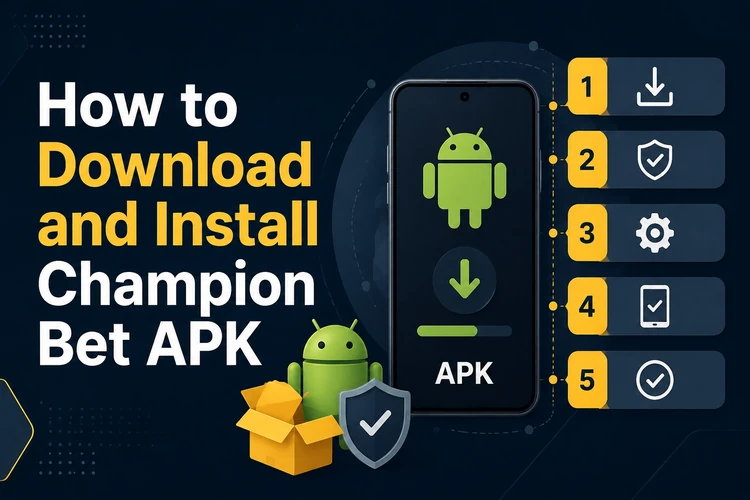
The installation process is straightforward, although the wording of Android menus can differ between phone brands. Follow the sequence below and keep the browser open until the file has finished downloading.
- Step 1: Open the official Champion Bet website in the Android browser and find the mobile application download area. Tap the download control and wait until the APK file is complete.
- Step 2: Open Settings and go to Security, Privacy, or Apps, depending on the device. Find the setting for installing unknown apps and select the browser used for the download.
- Step 3: Allow that browser to install an app from this source. Use this permission only when needed, and return to the same setting afterward to disable it if you prefer.
- Step 4: Open the Downloads folder or tap the completed download notification. Select the APK file and review the Android installation screen before continuing.
- Step 5: Tap Install and wait for the process to finish. If Android reports insufficient storage, remove unnecessary files and start the installation again.
- Step 6: Tap Open or launch the new icon from the app drawer. Sign in with an existing account, or follow the in-app registration instructions if you are a new user.
If the file does not open, confirm that it is intended for Android, that the download was not interrupted, and that the browser has the required temporary permission. Restarting the phone can clear a short-lived system error. Never attempt to bypass a warning by installing a second file from an unverified source.
Main Features of the Champion Bet App
The app brings sports markets to a mobile screen, including common events such as football, basketball, and tennis where available. Users can review pre-match markets, select odds, and follow live events through the in-play section. Live odds can change quickly, so check the selection and total stake carefully before confirming a bet.
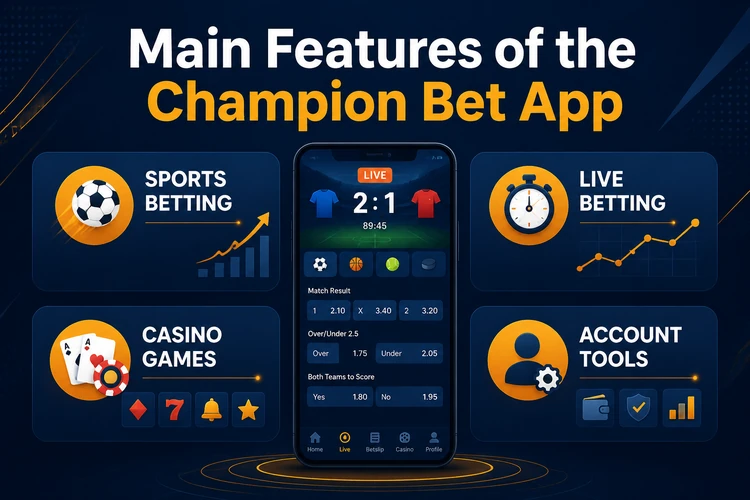
Depending on the services available to the account and region, the casino area may contain games such as slots, roulette, blackjack, or live dealer tables. The application also provides account tools for reviewing the balance, beginning a deposit or withdrawal request, checking transaction and betting history, and managing notifications. Available payment methods, limits, and processing times should always be confirmed inside the account before a transaction is submitted.
The layout is built for a smaller touchscreen, with sections and event filters that help reduce unnecessary scrolling. A reliable connection remains essential, particularly for live content and payment screens. Keep the phone's operating system updated and avoid using public Wi-Fi for sensitive account actions whenever possible.
Tips for Safe APK Installation
Only download the APK from the official platform source. Third-party repositories and file-sharing pages can distribute modified files that collect passwords, display unwanted advertising, or attempt to access payment information. If you are uncertain about a download, use the contact page to ask support to confirm the correct source before opening the file.
Check the file before installation. A download that stops unexpectedly, has an unusual name, or differs materially from the version information shown on the official page should not be opened. Android's security warning should be read rather than dismissed automatically. Once the installation is complete, disable the browser's unknown-app permission if you do not plan to use it again.
Protect the account with a unique password and do not share login details through messages or social networks. Review the device's installed-app list from time to time and remove software you do not recognize. Install updates promptly, and stop using the app if it begins requesting unexpected permissions, showing suspicious pop-ups, or behaving differently after an unofficial update.
Finally, betting and casino games involve financial risk. Set a personal spending limit, keep payment confirmations, and use the platform's responsible gambling tools if you need to restrict your activity. An APK cannot make outcomes more predictable, so treat the application as a technical access method rather than a guarantee of winnings.
FAQ
Champion Bet APK is the Android installation file for the platform's mobile application. It lets a user install the app directly on a compatible phone instead of relying on Google Play. After installation, the available functions may include sports markets, casino games, account management, and payment tools, subject to the user's region and account status.
Open the official Champion Bet website in an Android browser and use the application download area provided there. Wait for the file to finish downloading before opening it. Avoid third-party repositories, as files from those sources may be outdated or modified. Check the displayed version information before starting installation.
An APK is safest when it comes from the verified platform source and has not been modified. Check the file and Android security prompts before installing, and do not grant permissions that seem unrelated to the app's function. Keep both Android and the application updated, and contact support if a download source appears suspicious.
Download the file, open Settings, and allow your chosen browser to install unknown apps. Then open the completed download, review the installation prompt, and tap Install. The exact menu names vary by Android version and phone manufacturer. After installation, disable the temporary permission if you no longer need it.
Yes. Download the newer file from the official source and install it over the existing application rather than deleting the current version first. This usually preserves the installed app's local settings, while your account information remains held by the platform. If the update fails, check storage, connection, and device compatibility.
No Android application works on every device. Compatibility depends on the phone's Android version, available storage, hardware, and the requirements stated on the official download page. A current operating system and sufficient free space improve the chance of a smooth installation. If the file is rejected, confirm the supported requirements before trying again.
Downloading the installation file does not normally require a separate subscription, but account transactions and real-money betting involve financial decisions. Deposit and withdrawal conditions, minimums, and any applicable charges should be checked in the account before use. Only adults should participate: <strong>18+</strong>